Submitting a timesheet
This walks through filing a monthly timesheet on an hourly contract — from opening a draft, through accumulating entries as you work, to filing the submission for review.
The whole flow happens inside your contractor repo. Two GitHub primitives do all the work:
- An Issue holds your timesheet while you fill it in. You can edit it over days or weeks.
- A Pull Request is created automatically when you submit. Your QuantEcon administrator reviews and merges it; that's when payment processing begins.
1. Open a draft
Go to your contractor repo's Issues tab and click New Issue. Pick the 📋 Hourly Timesheet template.
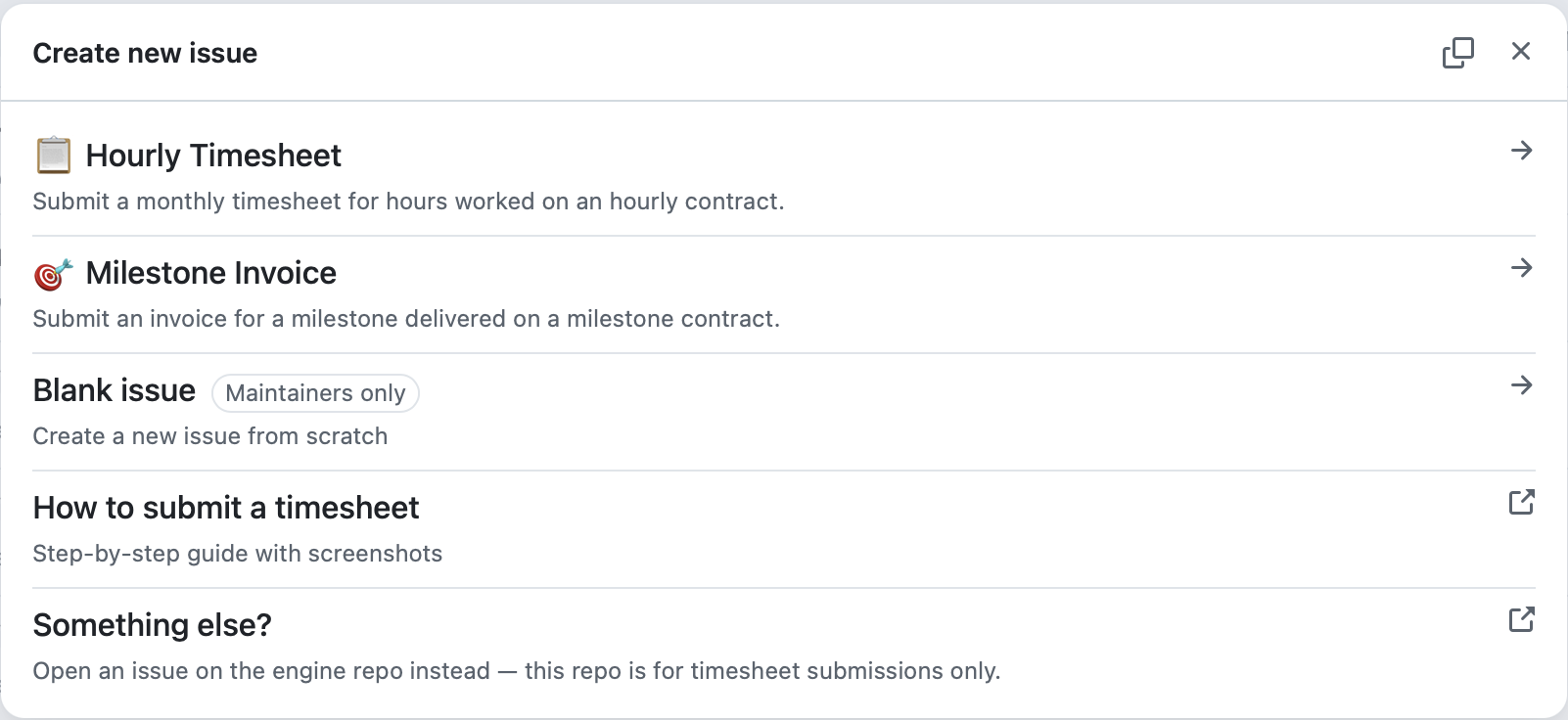
Fill in the three dropdowns and the confirmation checkbox:
- Contract — pick the contract this timesheet applies to. The list shows only your active contracts.
- Year + Month — the period this timesheet covers.
- Time Entries — leave the seeded
Date | Hours | Descriptiontable as-is for now. You'll add your real rows once the issue exists. - Confirmation — tick the box.
Click Submit new issue.
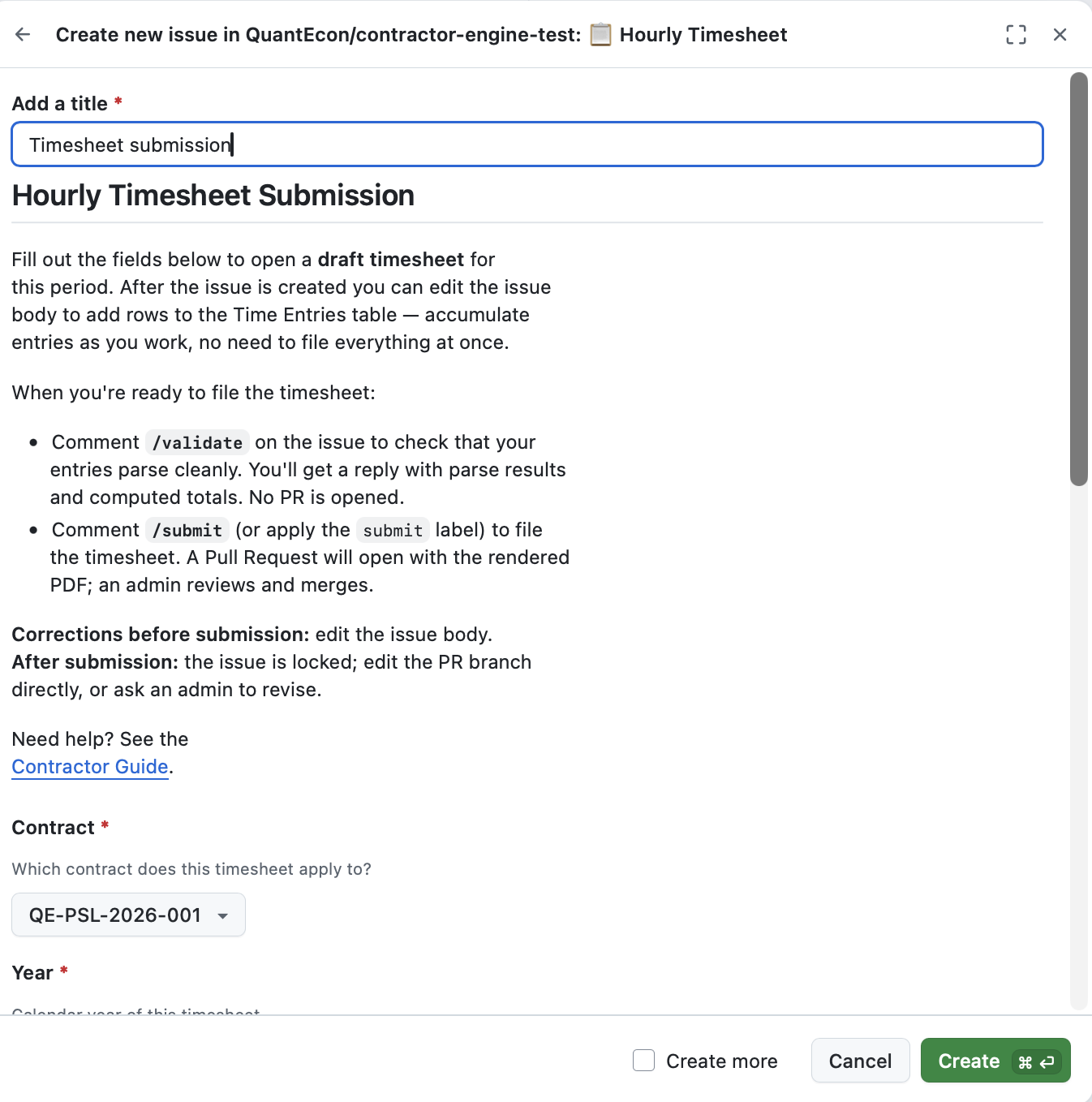
Nothing is filed yet
Creating the issue does not create a PR. The issue is a draft — yours to edit until you're ready to submit.
2. Add entries as you work
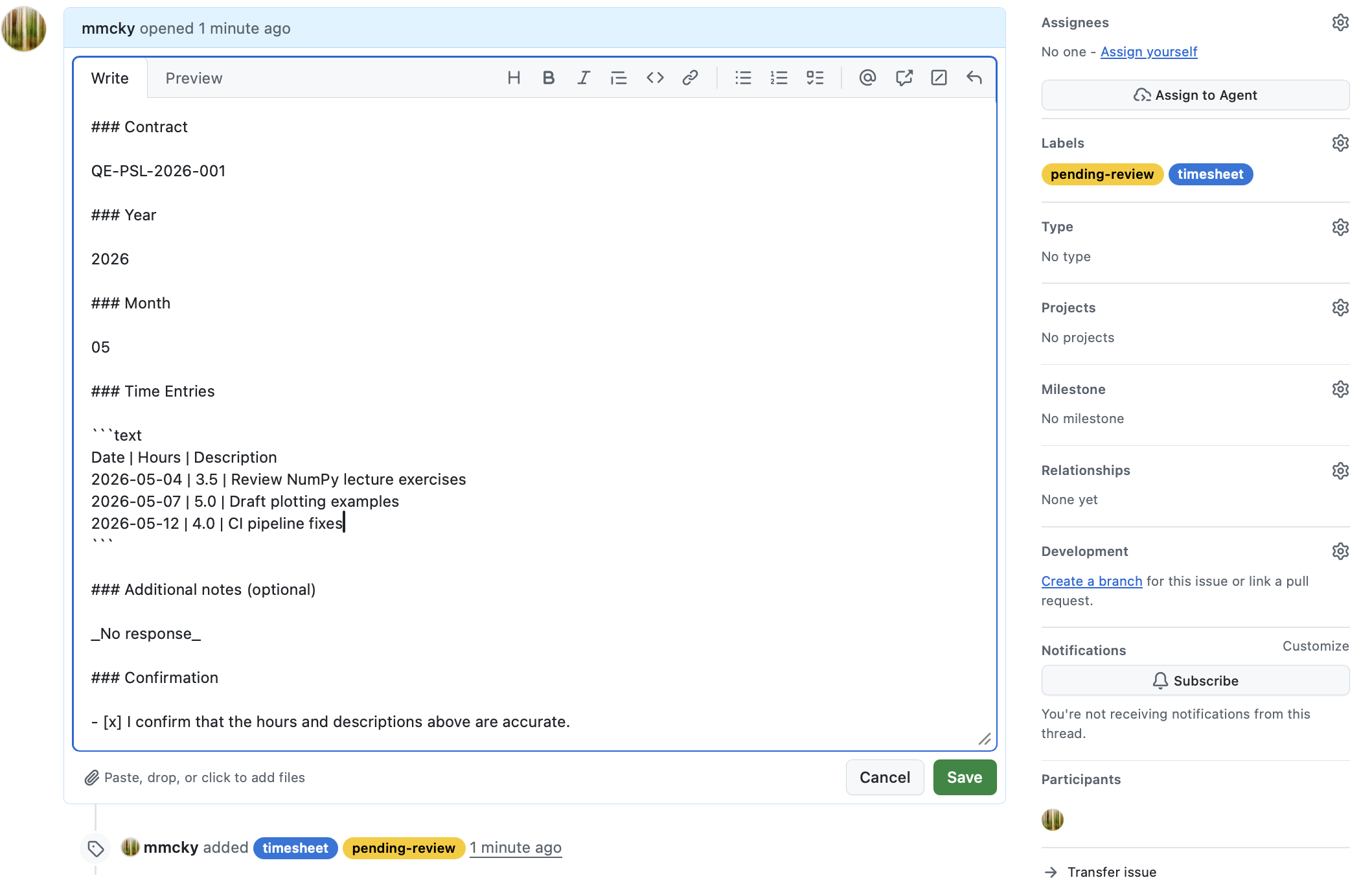
Open the issue you just created. Click the ⋯ menu in the top-right of
the issue body → Edit. The body is a code block under
### Time Entries — that's where you add rows.
Each row goes on its own line in the format:
YYYY-MM-DD | hours | description
For example, after a few days of work the entries table might look like:
Date | Hours | Description
2026-05-04 | 3.5 | Review NumPy lecture exercises
2026-05-07 | 5.0 | Draft plotting examples
2026-05-12 | 4.0 | CI pipeline fixes
Things to know:
- Keep the header row (
Date | Hours | Description). The parser uses it to recognise the entries table. - Hours can be fractional (
3.5,0.25). The unit is hours, not minutes. - Descriptions can contain anything, including pipes. The parser
splits each row on the first two
|only — everything after the second pipe is the description. - One row per day. If you worked multiple sessions in one day, sum them on a single row and describe both in the description.
Save the issue (the green Update comment button) any time you've added a batch of entries. You can come back and edit again as many times as you like.
3. Check your work with /validate
Before filing, run a pre-flight check. Post a comment on the issue with just:
/validate
After a few seconds, a bot reply appears with the parse result.
On success you'll see a green-check confirmation with computed totals:
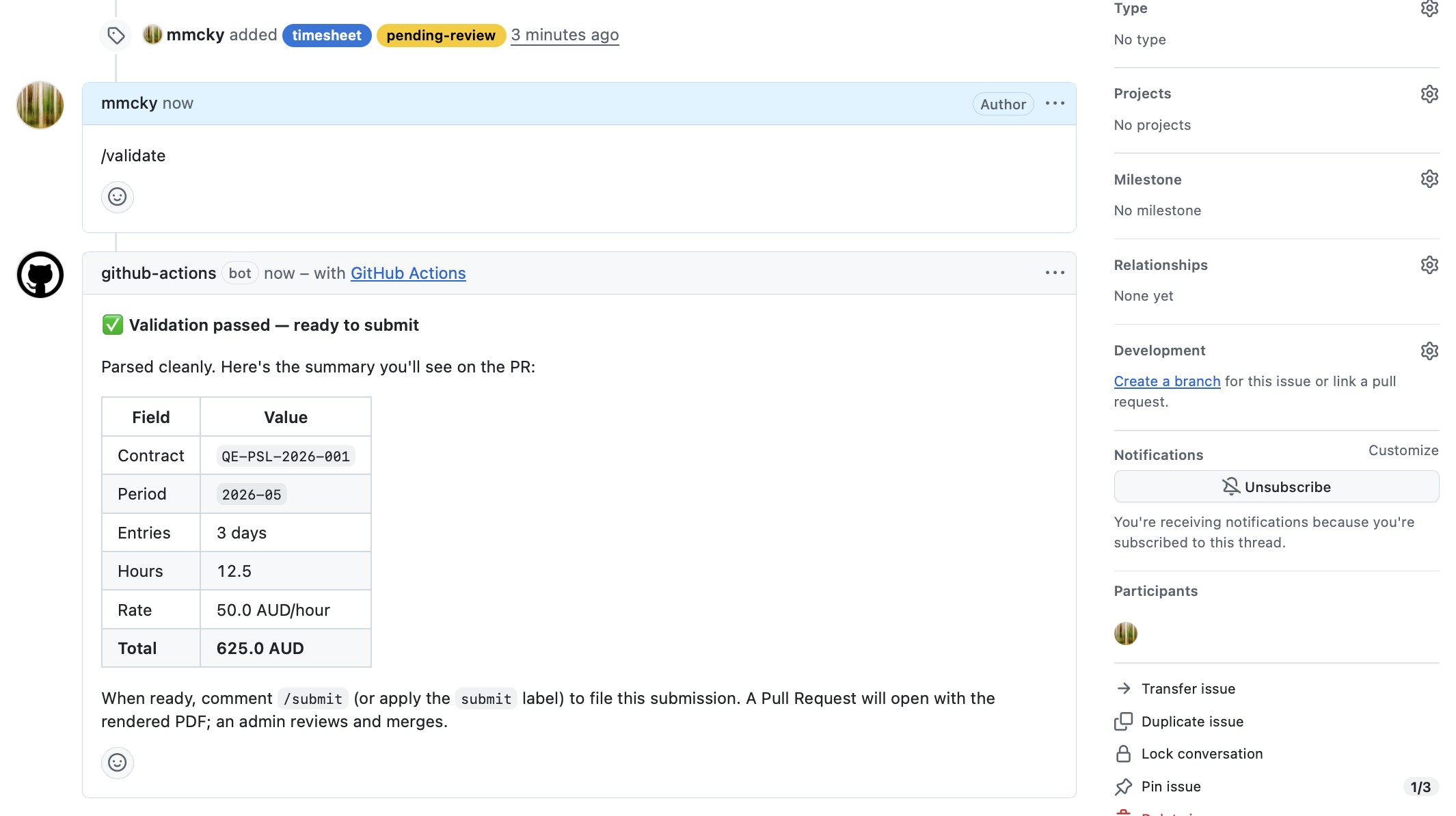
The totals are calculated using your contract's rate and currency, so they're exactly what will appear on the rendered PDF.
On failure you'll see a red-X reply pointing at specific lines:
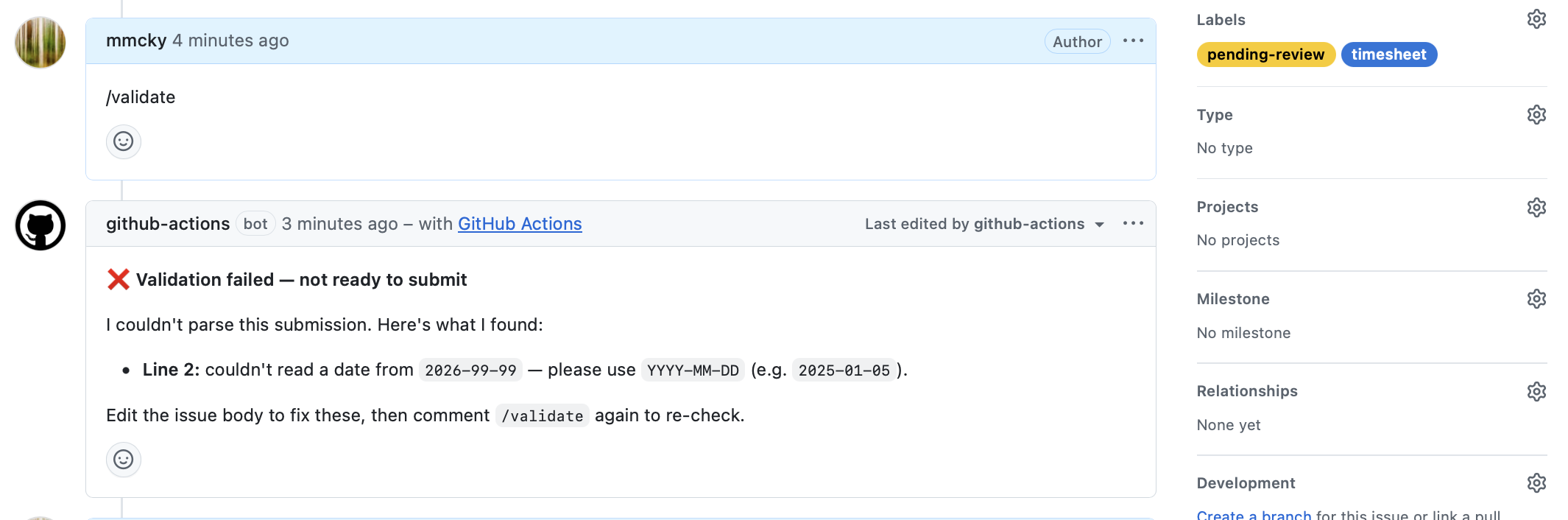
Common issues:
| What you see | What it means | Fix |
|---|---|---|
Line N: couldn't read a date from 'X' |
Date isn't in YYYY-MM-DD form |
Reformat the date |
Line N: date 'X' is outside the selected period 'YYYY-MM' |
Day doesn't match the Year/Month dropdowns | Either change the date or change the period |
Line N: duplicate date 'X' |
Two rows share a date | Merge them into one row |
Time Entries section is empty |
No rows, or only the header row | Add at least one data row |
Fix the issue, save, and run /validate again. The bot updates the same
comment in place — no spam.
Re-validate as often as you like
/validate doesn't file anything. Use it whenever you're unsure
whether a row will parse cleanly.
4. Submit
When validation passes and you're ready to file, post:
/submit
Or, equivalently, apply the submit label to the issue from the
right-hand sidebar.
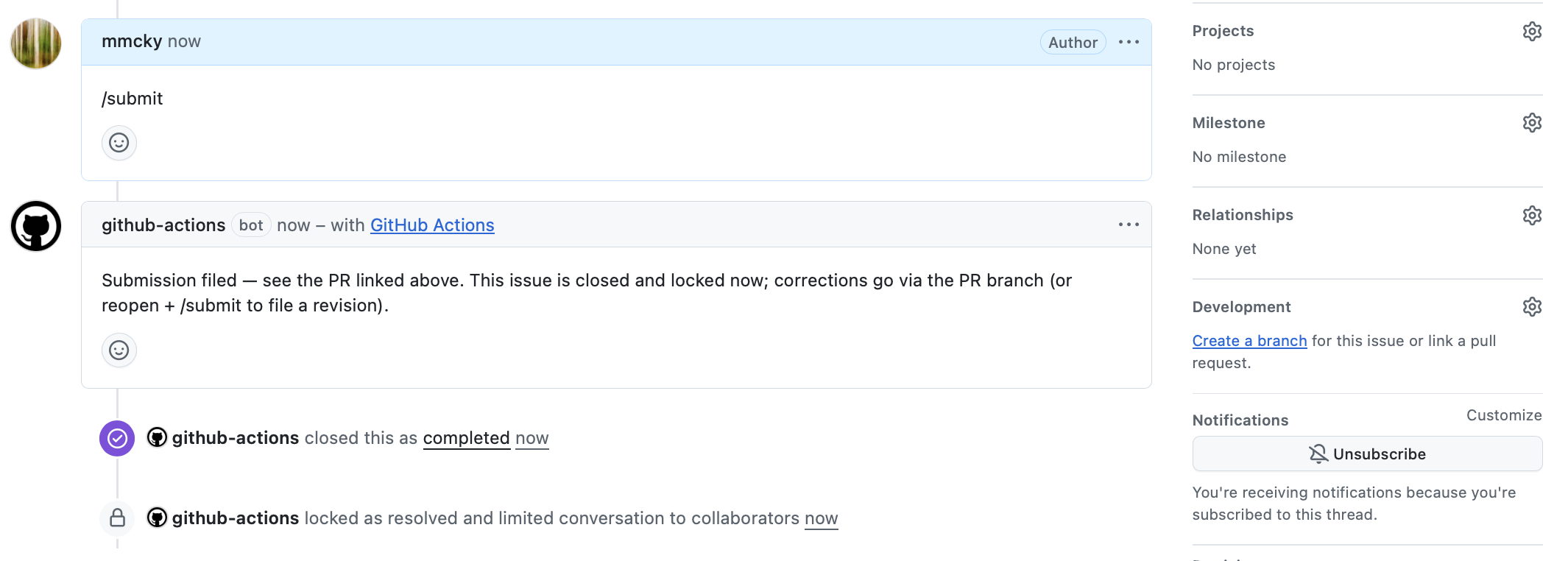
Within ~30 seconds:
- A Pull Request opens in your repo. It contains the structured YAML of your submission, a rendered PDF, and an inline PNG preview.
- Your QuantEcon administrator is automatically requested as reviewer (via CODEOWNERS).
- The originating issue is closed and locked, with a comment linking to the PR.
You don't need to do anything with the PR — your administrator handles review and merging.
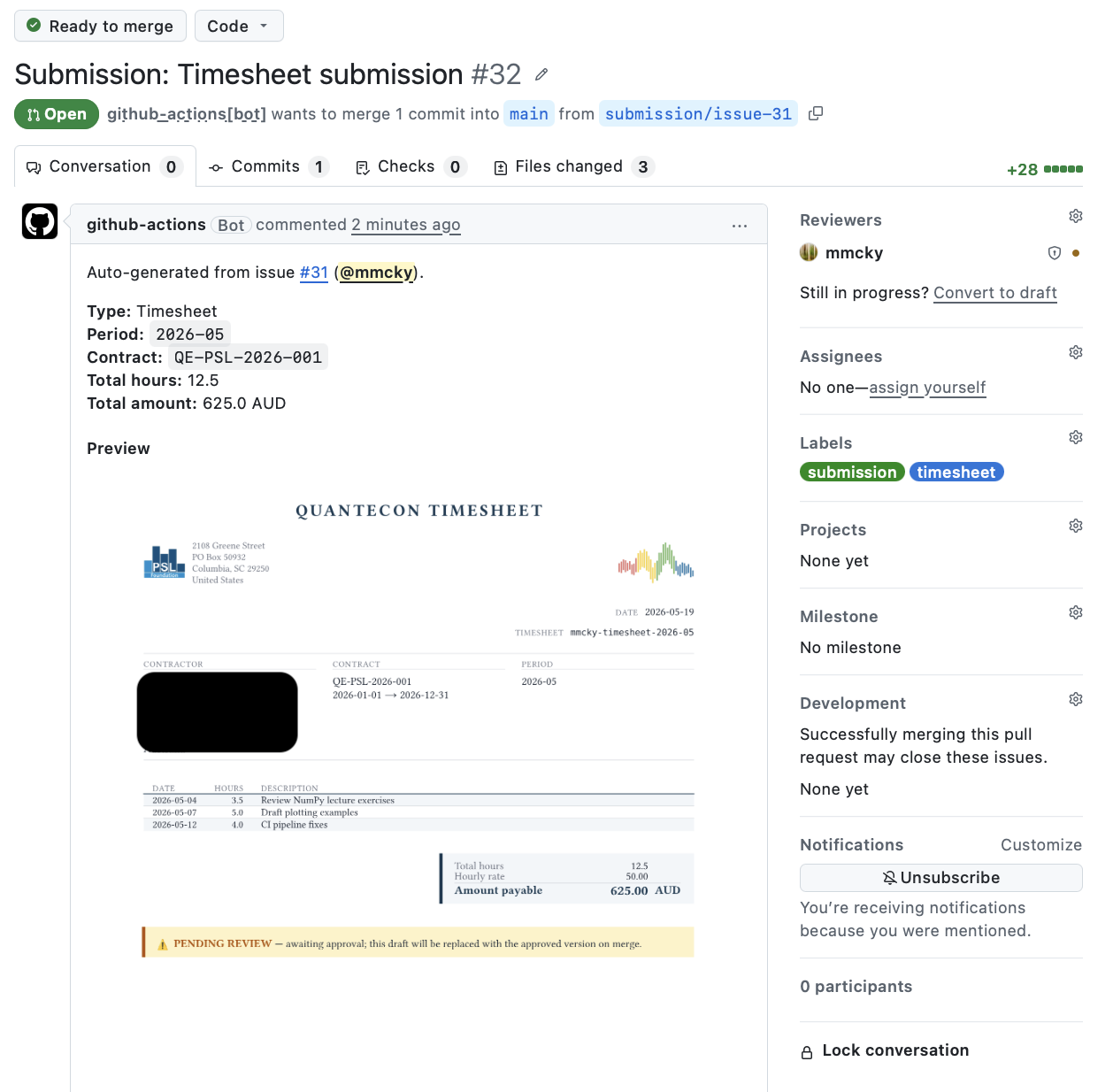
5. After submission
Once your administrator merges the PR:
- The PDF is re-rendered with approval metadata (your administrator's name and the approval date).
- Your contract's running ledger issue is updated to reflect the approved timesheet.
- A confirmation email is sent to the QuantEcon payment processor.
- You receive a notification on the original issue confirming the approval.
You don't need to take any further action. Payment processing happens outside GitHub on the fiscal host's normal cycle (typically 1–4 weeks).
Reminders if you forget to file
On the first of each month, an automated reminder posts on any open draft whose period has ended. If you started a draft for April and haven't submitted by the time May begins, you'll see something like:
🔔 Reminder — period
2026-04has endedThis timesheet hasn't been submitted yet. When you're ready: comment
/validateto check your entries, then/submitto file the timesheet. If you have nothing to file for2026-04, you can close this issue.
The reminder fires at most once per (issue, period). You won't be double-pinged.
Corrections and revisions
- Before you submit — just edit the issue body. Re-run
/validatewhenever you want. - After you submit, before the PR merges — your administrator can request changes via standard PR review.
- After the PR merges, before payment — the issue can be reopened
and
/submitted again to file a revision. The original PDF is kept as the audit trail; the new one supersedes it on the ledger. See Corrections and revisions for the details.
When something goes wrong
If a /submit fails validation, the engine posts a parse-error comment
on the issue (using the same format as /validate) and labels the
issue parse-error. No PR is created. Fix the body, then either:
- Comment
/submitagain, or - Re-apply the
submitlabel (the previous one was auto-removed so re-applying re-triggers).
If anything else looks wrong — the bot doesn't respond, the PR doesn't open, the PDF looks off — contact your QuantEcon administrator. The issue stays in place as the record of what you tried to file.