23. 调试与错误处理#
“调试的难度是编写代码的两倍。因此,如果你尽可能聪明地编写代码,那么根据定义,你就没有足够的智慧来调试它。” – Brian Kernighan
23.1. 概述#
你是否是那种在调试程序时喜欢在代码中到处添加 print 语句的程序员?
嘿,我们都曾经这样做过。
(好吧,有时候我们仍然这样做……)
但是,一旦你开始编写更大的程序,你就需要一个更好的系统。
你可能还希望在代码运行时处理潜在的错误。
在本讲座中,我们将讨论如何调试程序并改善错误处理。
23.2. 调试#
Python 的调试工具因平台、集成开发环境和编辑器的不同而有所差异。
例如,JupyterLab 中提供了一个可视化调试器。
这里我们将重点介绍 Jupyter Notebook,并让你自行探索其他设置。
我们需要以下导入
import numpy as np
import matplotlib.pyplot as plt
import matplotlib as mpl  # i18n
import matplotlib.font_manager  # i18n
FONTPATH = "_fonts/SourceHanSerifSC-SemiBold.otf"  # i18n
mpl.font_manager.fontManager.addfont(FONTPATH)  # i18n
import logging  # i18n
logging.getLogger('matplotlib.font_manager').setLevel(logging.ERROR)  # i18n
mpl.rcParams['font.family'] = ['Source Han Serif SC']  # i18n
23.2.1. debug 魔法命令#
让我们考虑一个简单(且相当刻意设计)的例子
def plot_log():
    fig, ax = plt.subplots(2, 1)
    x = np.linspace(1, 2, 10)
    ax.plot(x, np.log(x))
    plt.show()

plot_log()  # 调用函数,生成图形
---------------------------------------------------------------------------
AttributeError                            Traceback (most recent call last)
Cell In[2], line 7
      3     x = np.linspace(1, 2, 10)
      4     ax.plot(x, np.log(x))
      5     plt.show()
      6
----> 7 plot_log()  # 调用函数,生成图形

Cell In[2], line 4, in plot_log()
      1 def plot_log():
      2     fig, ax = plt.subplots(2, 1)
      3     x = np.linspace(1, 2, 10)
----> 4     ax.plot(x, np.log(x))
      5     plt.show()

AttributeError: 'numpy.ndarray' object has no attribute 'plot'
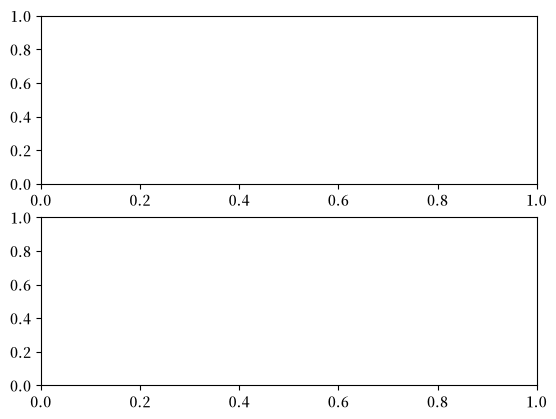
这段代码的目的是在区间 \([1, 2]\) 上绘制 log 函数。
但这里有一个错误:plt.subplots(2, 1) 应该只是 plt.subplots()。
(调用 plt.subplots(2, 1) 会返回一个包含两个坐标轴对象的 NumPy 数组,适合在同一图形上绘制两个子图)
回溯信息显示错误发生在方法调用 ax.plot(x, np.log(x)) 处。
错误的原因是我们错误地将 ax 设为了一个 NumPy 数组,而 NumPy 数组没有 plot 方法。
但让我们假装暂时不理解这一点。
我们可能怀疑 ax 有问题,但当我们尝试检查这个对象时,会得到以下异常:
ax
---------------------------------------------------------------------------
NameError                                 Traceback (most recent call last)
Cell In[3], line 1
----> 1 ax

NameError: name 'ax' is not defined
问题在于 ax 是在 plot_log() 内部定义的,函数一旦终止,这个名称就消失了。
让我们换一种方式来尝试。
我们再次运行第一个代码块,产生相同的错误
def plot_log():
    fig, ax = plt.subplots(2, 1)
    x = np.linspace(1, 2, 10)
    ax.plot(x, np.log(x))
    plt.show()

plot_log()  # 调用函数,生成图形
---------------------------------------------------------------------------
AttributeError                            Traceback (most recent call last)
Cell In[4], line 7
      3     x = np.linspace(1, 2, 10)
      4     ax.plot(x, np.log(x))
      5     plt.show()
      6
----> 7 plot_log()  # 调用函数,生成图形

Cell In[4], line 4, in plot_log()
      1 def plot_log():
      2     fig, ax = plt.subplots(2, 1)
      3     x = np.linspace(1, 2, 10)
----> 4     ax.plot(x, np.log(x))
      5     plt.show()

AttributeError: 'numpy.ndarray' object has no attribute 'plot'
但这次我们在下面的代码块中输入
%debug
你应该会进入一个新的提示符,看起来像这样
ipdb>
(你可能看到的是 pdb>)
现在我们可以在程序的这个位置检查变量的值,逐步执行代码,等等。
例如,这里我们只需输入名称 ax 来查看这个对象发生了什么:
ipdb> ax
array([<matplotlib.axes.AxesSubplot object at 0x290f5d0>,
       <matplotlib.axes.AxesSubplot object at 0x2930810>], dtype=object)
现在很清楚,ax 是一个数组,这明确了问题的根源。
要了解在 ipdb(或 pdb)内部还能做什么,请使用在线帮助
ipdb> h

Documented commands (type help <topic>):
========================================
EOF    bt         cont      enable  jump  pdef   r        tbreak   w
a      c          continue  exit    l     pdoc   restart  u        whatis
alias  cl         d         h       list  pinfo  return   unalias  where
args   clear      debug     help    n     pp     run      unt
b      commands   disable   ignore  next  q      s        until
break  condition  down      j       p     quit   step     up

Miscellaneous help topics:
==========================
exec  pdb

Undocumented commands:
======================
retval  rv

ipdb> h c
c(ont(inue))
Continue execution, only stop when a breakpoint is encountered.
23.2.2. 设置断点#
上面的方法很方便,但有时候不够用。
考虑以下对上述函数的修改版本
def plot_log():
    fig, ax = plt.subplots()
    x = np.logspace(1, 2, 10)
    ax.plot(x, np.log(x))
    plt.show()

plot_log()
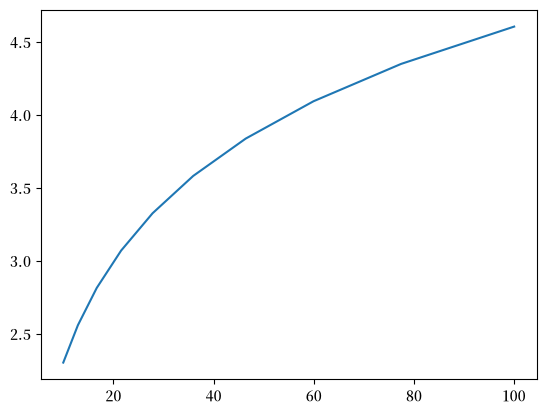
这里原来的问题已经修复,但我们不小心写成了 np.logspace(1, 2, 10) 而不是 np.linspace(1, 2, 10)。
现在不会有任何异常,但图形看起来不对。
为了查找原因,如果我们能在函数执行期间检查像 x 这样的变量,将会很有帮助。
为此,我们通过在函数代码块中插入 breakpoint() 来添加一个”断点”
def plot_log():
    breakpoint()
    fig, ax = plt.subplots()
    x = np.logspace(1, 2, 10)
    ax.plot(x, np.log(x))
    plt.show()

plot_log()
现在让我们运行脚本,并通过调试器进行检查
> <ipython-input-6-a188074383b7>(6)plot_log()
-> fig, ax = plt.subplots()
(Pdb) n
> <ipython-input-6-a188074383b7>(7)plot_log()
-> x = np.logspace(1, 2, 10)
(Pdb) n
> <ipython-input-6-a188074383b7>(8)plot_log()
-> ax.plot(x, np.log(x))
(Pdb) x
array([ 10.        ,  12.91549665,  16.68100537,  21.5443469 ,
        27.82559402,  35.93813664,  46.41588834,  59.94842503,
        77.42636827, 100.        ])
我们使用了两次 n 来逐步执行代码(每次一行)。
然后我们打印了 x 的值,以查看该变量发生了什么。
要退出调试器,使用 q。
23.2.3. 其他有用的魔法命令#
在本讲座中,我们使用了 %debug IPython 魔法命令。
还有许多其他有用的魔法命令:
%precision 4将浮点数的打印精度设置为 4 位小数%whos给出变量及其值的列表%quickref给出魔法命令的列表
完整的魔法命令列表在这里。
23.3. 错误处理#
有时候,在编写代码时,我们可以预见到程序中的缺陷和错误。
例如,样本 \(y_1, \ldots, y_n\) 的无偏样本方差定义为
这可以使用 np.var 在 NumPy 中计算。
但如果你在编写一个处理此类计算的函数时,你可能会预见到当样本大小为 1 时会出现除以零的错误。
一种可能的处理方式是什么都不做——程序只会崩溃,并输出一条错误消息。
但有时候,以一种能够预见并处理你认为可能出现的运行时错误的方式编写代码是值得的。
为什么?
因为解释器提供的调试信息通常不如精心编写的错误消息有用。
因为导致执行停止的错误会中断工作流程。
因为如果你是为他人编写代码,这会降低用户对你代码的信心。
在本节中,我们将讨论 Python 中不同类型的错误以及处理程序中潜在错误的技术。
23.3.1. Python 中的错误#
我们在之前的示例中见过 AttributeError 和 NameError。
在 Python 中,有两种类型的错误——语法错误和异常。
以下是一种常见错误类型的示例
def f:
  Cell In[6], line 1
    def f:
         ^
SyntaxError: expected '('
由于非法语法无法执行,语法错误会终止程序的执行。
以下是另一种与语法无关的错误
1 / 0
---------------------------------------------------------------------------
ZeroDivisionError                         Traceback (most recent call last)
Cell In[7], line 1
----> 1 1 / 0

ZeroDivisionError: division by zero
还有另一个
x1 = y1
---------------------------------------------------------------------------
NameError                                 Traceback (most recent call last)
Cell In[8], line 1
----> 1 x1 = y1

NameError: name 'y1' is not defined
以及另一个
'foo' + 6
---------------------------------------------------------------------------
TypeError                                 Traceback (most recent call last)
Cell In[9], line 1
----> 1 'foo' + 6

TypeError: can only concatenate str (not "int") to str
还有另一个
X = []
x = X[0]
---------------------------------------------------------------------------
IndexError                                Traceback (most recent call last)
Cell In[10], line 2
      1 X = []
----> 2 x = X[0]

IndexError: list index out of range
每次,解释器都会告知我们错误类型
NameError、TypeError、IndexError、ZeroDivisionError等。
在 Python 中,这些错误被称为异常。
23.3.2. 断言#
有时候,通过检查程序是否按预期运行,可以避免错误。
处理检查的一种相对简单的方法是使用 assert 关键字。
例如,假设 np.var 函数不存在,我们需要自己编写
def var(y):
    n = len(y)
    assert n > 1, 'Sample size must be greater than one.'
    return np.sum((y - y.mean())**2) / float(n-1)
如果我们用长度为 1 的数组运行这个函数,程序将终止并打印我们的错误消息
var([1])
---------------------------------------------------------------------------
AssertionError                            Traceback (most recent call last)
Cell In[12], line 1
----> 1 var([1])

Cell In[11], line 3, in var(y)
      1 def var(y):
      2     n = len(y)
----> 3     assert n > 1, 'Sample size must be greater than one.'
      4     return np.sum((y - y.mean())**2) / float(n-1)

AssertionError: Sample size must be greater than one.
这样做的优点是我们可以
尽早失败,一旦我们知道会有问题就立即报错
提供关于程序失败原因的具体信息
23.3.3. 运行时错误处理#
上面使用的方法有一定的局限性,因为它总是导致程序终止。
有时我们可以更优雅地处理错误,通过处理特殊情况。
让我们来看看这是如何实现的。
23.3.3.1. 捕获异常#
我们可以使用 try – except 块来捕获和处理异常。
以下是一个简单的例子
def f(x):
    try:
        return 1.0 / x
    except ZeroDivisionError:
        print('Error: division by zero.  Returned None')
    return None
当我们调用 f 时,得到以下输出
f(2)
0.5
f(0)
Error: division by zero. Returned None
f(0.0)
Error: division by zero. Returned None
错误被捕获,程序的执行没有被终止。
请注意,其他错误类型不会被捕获。
如果我们担心用户可能会传入字符串,我们也可以捕获该错误
def f(x):
    try:
        return 1.0 / x
    except ZeroDivisionError:
        print('Error: Division by zero.  Returned None')
    except TypeError:
        print(f'Error: x cannot be of type {type(x)}.  Returned None')
    return None
以下是发生的情况
f(2)
0.5
f(0)
Error: Division by zero. Returned None
f('foo')
Error: x cannot be of type <class 'str'>. Returned None
如果我们觉得懒,可以将这些错误一起捕获
def f(x):
    try:
        return 1.0 / x
    except:
        print(f'Error.  An issue has occurred with x = {x} of type: {type(x)}')
    return None
以下是发生的情况
f(2)
0.5
f(0)
Error. An issue has occurred with x = 0 of type: <class 'int'>
f('foo')
Error. An issue has occurred with x = foo of type: <class 'str'>
一般来说,具体指定错误类型会更好。
23.4. 练习#
Exercise 23.1
假设我们有一个文本文件 numbers.txt,其中包含以下内容
prices
3
8

7
21
使用 try – except,编写一个程序来读取文件内容并对数字求和,忽略没有数字的行。
你可以使用我们之前学过的 open() 函数来打开 numbers.txt。
Solution
让我们先保存数据
%%file numbers.txt
prices
3
8

7
21
Writing numbers.txt
f = open('numbers.txt')

total = 0.0
for line in f:
    try:
        total += float(line)
    except ValueError:
        pass

f.close()

print(total)
39.0