7. 名称与命名空间#
7.1. 概述#
本讲座的主题是变量名称、如何使用它们以及 Python 解释器如何理解它们。
这听起来可能有些枯燥,但 Python 采用的名称处理模型既优雅又有趣。
此外,如果你对 Python 中名称的工作原理有深入理解,将为自己节省大量调试时间。
7.2. Python 中的变量名称#
考虑以下 Python 语句:
x = 42
我们现在知道,当这条语句被执行时,Python 会在计算机内存中创建一个 int 类型的对象,其中包含:
值
42一些相关属性
但 x 本身是什么呢?
在 Python 中,x 被称为名称,语句 x = 42 将名称 x 绑定到我们刚刚讨论的整数对象上。
在底层,这个将名称绑定到对象的过程是作为字典实现的——稍后我们会详细介绍。
将两个或多个名称绑定到同一个对象是完全没有问题的,无论该对象是什么:
def f(string):      # Create a function called f
    print(string)   # that prints any string it's passed

g = f
id(g) == id(f)
True
g('test')
test
第一步,创建了一个函数对象,名称 f 被绑定到它上面。
将名称 g 绑定到同一个对象之后,我们可以在任何使用 f 的地方使用 g。
当绑定到某个对象的名称数量降为零时会发生什么?
下面是这种情况的一个例子,名称 x 首先被绑定到一个对象,然后被重新绑定到另一个对象:
x = 'foo'
id(x)
x = 'bar'
id(x)
139813809013840
在这种情况下,当我们将 x 重新绑定到 'bar' 之后,没有任何名称绑定到第一个对象 'foo'。
这会触发 'foo' 被垃圾回收。
换句话说,存储该对象的内存空间被释放并归还给操作系统。
垃圾回收实际上是计算机科学中一个活跃的研究领域。
如果你感兴趣,可以阅读更多关于垃圾回收的内容。
7.3. 命名空间#
回顾前面的讨论,语句
x = 42
将名称 x 绑定到右侧的整数对象上。
我们还提到,这个将 x 绑定到正确对象的过程是作为字典实现的。
这个字典被称为命名空间。
定义
命名空间是一个符号表,将名称映射到内存中的对象。
Python 使用多个命名空间,并根据需要动态创建它们。
例如,每次我们导入一个模块时,Python 都会为该模块创建一个命名空间。
为了观察这一过程,假设我们编写一个脚本 mathfoo.py,其中只有一行:
%%file mathfoo.py
pi = 'foobar'
Writing mathfoo.py
现在我们启动 Python 解释器并导入它:
import mathfoo
接下来让我们从标准库导入 math 模块:
import math
这两个模块都有一个叫做 pi 的属性:
math.pi
3.141592653589793
mathfoo.pi
'foobar'
pi 的这两个不同绑定存在于不同的命名空间中,每个命名空间都作为一个字典实现。
如果你愿意,可以使用 module_name.__dict__ 直接查看字典。
import math

math.__dict__.items()
dict_items([('__name__', 'math'), ('__doc__', 'This module provides access to the mathematical functions\ndefined by the C standard.'), ('__package__', ''), ('__loader__', <_frozen_importlib_external.ExtensionFileLoader object at 0x7f28f20fda30>), ('__spec__', ModuleSpec(name='math', loader=<_frozen_importlib_external.ExtensionFileLoader object at 0x7f28f20fda30>, origin='/home/runner/miniconda3/envs/quantecon/lib/python3.13/lib-dynload/math.cpython-313-x86_64-linux-gnu.so')), ('acos', <built-in function acos>), ('acosh', <built-in function acosh>), ('asin', <built-in function asin>), ('asinh', <built-in function asinh>), ('atan', <built-in function atan>), ('atan2', <built-in function atan2>), ('atanh', <built-in function atanh>), ('cbrt', <built-in function cbrt>), ('ceil', <built-in function ceil>), ('copysign', <built-in function copysign>), ('cos', <built-in function cos>), ('cosh', <built-in function cosh>), ('degrees', <built-in function degrees>), ('dist', <built-in function dist>), ('erf', <built-in function erf>), ('erfc', <built-in function erfc>), ('exp', <built-in function exp>), ('exp2', <built-in function exp2>), ('expm1', <built-in function expm1>), ('fabs', <built-in function fabs>), ('factorial', <built-in function factorial>), ('floor', <built-in function floor>), ('fma', <built-in function fma>), ('fmod', <built-in function fmod>), ('frexp', <built-in function frexp>), ('fsum', <built-in function fsum>), ('gamma', <built-in function gamma>), ('gcd', <built-in function gcd>), ('hypot', <built-in function hypot>), ('isclose', <built-in function isclose>), ('isfinite', <built-in function isfinite>), ('isinf', <built-in function isinf>), ('isnan', <built-in function isnan>), ('isqrt', <built-in function isqrt>), ('lcm', <built-in function lcm>), ('ldexp', <built-in function ldexp>), ('lgamma', <built-in function lgamma>), ('log', <built-in function log>), ('log1p', <built-in function log1p>), ('log10', <built-in function log10>), ('log2', <built-in function log2>), ('modf', <built-in function modf>), ('pow', <built-in function pow>), ('radians', <built-in function radians>), ('remainder', <built-in function remainder>), ('sin', <built-in function sin>), ('sinh', <built-in function sinh>), ('sqrt', <built-in function sqrt>), ('tan', <built-in function tan>), ('tanh', <built-in function tanh>), ('sumprod', <built-in function sumprod>), ('trunc', <built-in function trunc>), ('prod', <built-in function prod>), ('perm', <built-in function perm>), ('comb', <built-in function comb>), ('nextafter', <built-in function nextafter>), ('ulp', <built-in function ulp>), ('__file__', '/home/runner/miniconda3/envs/quantecon/lib/python3.13/lib-dynload/math.cpython-313-x86_64-linux-gnu.so'), ('pi', 3.141592653589793), ('e', 2.718281828459045), ('tau', 6.283185307179586), ('inf', inf), ('nan', nan)])
import mathfoo

mathfoo.__dict__
{'__name__': 'mathfoo',
 '__doc__': None,
 '__package__': '',
 '__loader__': <_frozen_importlib_external.SourceFileLoader at 0x7f28e4ee9f10>,
 '__spec__': ModuleSpec(name='mathfoo', loader=<_frozen_importlib_external.SourceFileLoader object at 0x7f28e4ee9f10>, origin='/home/runner/work/lecture-python-programming.zh-cn/lecture-python-programming.zh-cn/lectures/mathfoo.py'),
 '__file__': '/home/runner/work/lecture-python-programming.zh-cn/lecture-python-programming.zh-cn/lectures/mathfoo.py',
 '__cached__': '/home/runner/work/lecture-python-programming.zh-cn/lecture-python-programming.zh-cn/lectures/__pycache__/mathfoo.cpython-313.pyc',
 '__builtins__': {'__name__': 'builtins',
  '__doc__': "Built-in functions, types, exceptions, and other objects.\n\nThis module provides direct access to all 'built-in'\nidentifiers of Python; for example, builtins.len is\nthe full name for the built-in function len().\n\nThis module is not normally accessed explicitly by most\napplications, but can be useful in modules that provide\nobjects with the same name as a built-in value, but in\nwhich the built-in of that name is also needed.",
  '__package__': '',
  '__loader__': _frozen_importlib.BuiltinImporter,
  '__spec__': ModuleSpec(name='builtins', loader=<class '_frozen_importlib.BuiltinImporter'>, origin='built-in'),
  '__build_class__': <function __build_class__>,
  '__import__': <function __import__(name, globals=None, locals=None, fromlist=(), level=0)>,
  'abs': <function abs(x, /)>,
  'all': <function all(iterable, /)>,
  'any': <function any(iterable, /)>,
  'ascii': <function ascii(obj, /)>,
  'bin': <function bin(number, /)>,
  'breakpoint': <function breakpoint(*args, **kws)>,
  'callable': <function callable(obj, /)>,
  'chr': <function chr(i, /)>,
  'compile': <function compile(source, filename, mode, flags=0, dont_inherit=False, optimize=-1, *, _feature_version=-1)>,
  'delattr': <function delattr(obj, name, /)>,
  'dir': <function dir>,
  'divmod': <function divmod(x, y, /)>,
  'eval': <function eval(source, /, globals=None, locals=None)>,
  'exec': <function exec(source, /, globals=None, locals=None, *, closure=None)>,
  'format': <function format(value, format_spec='', /)>,
  'getattr': <function getattr>,
  'globals': <function globals()>,
  'hasattr': <function hasattr(obj, name, /)>,
  'hash': <function hash(obj, /)>,
  'hex': <function hex(number, /)>,
  'id': <function id(obj, /)>,
  'input': <bound method Kernel.raw_input of <ipykernel.ipkernel.IPythonKernel object at 0x7f28ef3692b0>>,
  'isinstance': <function isinstance(obj, class_or_tuple, /)>,
  'issubclass': <function issubclass(cls, class_or_tuple, /)>,
  'iter': <function iter>,
  'aiter': <function aiter(async_iterable, /)>,
  'len': <function len(obj, /)>,
  'locals': <function locals()>,
  'max': <function max>,
  'min': <function min>,
  'next': <function next>,
  'anext': <function anext>,
  'oct': <function oct(number, /)>,
  'ord': <function ord(character, /)>,
  'pow': <function pow(base, exp, mod=None)>,
  'print': <function print(*args, sep=' ', end='\n', file=None, flush=False)>,
  'repr': <function repr(obj, /)>,
  'round': <function round(number, ndigits=None)>,
  'setattr': <function setattr(obj, name, value, /)>,
  'sorted': <function sorted(iterable, /, *, key=None, reverse=False)>,
  'sum': <function sum(iterable, /, start=0)>,
  'vars': <function vars>,
  'None': None,
  'Ellipsis': Ellipsis,
  'NotImplemented': NotImplemented,
  'False': False,
  'True': True,
  'bool': bool,
  'memoryview': memoryview,
  'bytearray': bytearray,
  'bytes': bytes,
  'classmethod': classmethod,
  'complex': complex,
  'dict': dict,
  'enumerate': enumerate,
  'filter': filter,
  'float': float,
  'frozenset': frozenset,
  'property': property,
  'int': int,
  'list': list,
  'map': map,
  'object': object,
  'range': range,
  'reversed': reversed,
  'set': set,
  'slice': slice,
  'staticmethod': staticmethod,
  'str': str,
  'super': super,
  'tuple': tuple,
  'type': type,
  'zip': zip,
  '__debug__': True,
  'BaseException': BaseException,
  'BaseExceptionGroup': BaseExceptionGroup,
  'Exception': Exception,
  'GeneratorExit': GeneratorExit,
  'KeyboardInterrupt': KeyboardInterrupt,
  'SystemExit': SystemExit,
  'ArithmeticError': ArithmeticError,
  'AssertionError': AssertionError,
  'AttributeError': AttributeError,
  'BufferError': BufferError,
  'EOFError': EOFError,
  'ImportError': ImportError,
  'LookupError': LookupError,
  'MemoryError': MemoryError,
  'NameError': NameError,
  'OSError': OSError,
  'ReferenceError': ReferenceError,
  'RuntimeError': RuntimeError,
  'StopAsyncIteration': StopAsyncIteration,
  'StopIteration': StopIteration,
  'SyntaxError': SyntaxError,
  'SystemError': SystemError,
  'TypeError': TypeError,
  'ValueError': ValueError,
  'Warning': Warning,
  'FloatingPointError': FloatingPointError,
  'OverflowError': OverflowError,
  'ZeroDivisionError': ZeroDivisionError,
  'BytesWarning': BytesWarning,
  'DeprecationWarning': DeprecationWarning,
  'EncodingWarning': EncodingWarning,
  'FutureWarning': FutureWarning,
  'ImportWarning': ImportWarning,
  'PendingDeprecationWarning': PendingDeprecationWarning,
  'ResourceWarning': ResourceWarning,
  'RuntimeWarning': RuntimeWarning,
  'SyntaxWarning': SyntaxWarning,
  'UnicodeWarning': UnicodeWarning,
  'UserWarning': UserWarning,
  'BlockingIOError': BlockingIOError,
  'ChildProcessError': ChildProcessError,
  'ConnectionError': ConnectionError,
  'FileExistsError': FileExistsError,
  'FileNotFoundError': FileNotFoundError,
  'InterruptedError': InterruptedError,
  'IsADirectoryError': IsADirectoryError,
  'NotADirectoryError': NotADirectoryError,
  'PermissionError': PermissionError,
  'ProcessLookupError': ProcessLookupError,
  'TimeoutError': TimeoutError,
  'IndentationError': IndentationError,
  '_IncompleteInputError': _IncompleteInputError,
  'IndexError': IndexError,
  'KeyError': KeyError,
  'ModuleNotFoundError': ModuleNotFoundError,
  'NotImplementedError': NotImplementedError,
  'PythonFinalizationError': PythonFinalizationError,
  'RecursionError': RecursionError,
  'UnboundLocalError': UnboundLocalError,
  'UnicodeError': UnicodeError,
  'BrokenPipeError': BrokenPipeError,
  'ConnectionAbortedError': ConnectionAbortedError,
  'ConnectionRefusedError': ConnectionRefusedError,
  'ConnectionResetError': ConnectionResetError,
  'TabError': TabError,
  'UnicodeDecodeError': UnicodeDecodeError,
  'UnicodeEncodeError': UnicodeEncodeError,
  'UnicodeTranslateError': UnicodeTranslateError,
  'ExceptionGroup': ExceptionGroup,
  'EnvironmentError': OSError,
  'IOError': OSError,
  'open': <function _io.open(file, mode='r', buffering=-1, encoding=None, errors=None, newline=None, closefd=True, opener=None)>,
  'copyright': Copyright (c) 2001-2024 Python Software Foundation.
  All Rights Reserved.

  Copyright (c) 2000 BeOpen.com.
  All Rights Reserved.

  Copyright (c) 1995-2001 Corporation for National Research Initiatives.
  All Rights Reserved.

  Copyright (c) 1991-1995 Stichting Mathematisch Centrum, Amsterdam.
  All Rights Reserved.,
  'credits': Thanks to CWI, CNRI, BeOpen, Zope Corporation, the Python Software
  Foundation, and a cast of thousands for supporting Python
  development.  See www.python.org for more information.,
  'license': Type license() to see the full license text,
  'help': Type help() for interactive help, or help(object) for help about object.,
  'execfile': <function _pydev_bundle._pydev_execfile.execfile(file, glob=None, loc=None)>,
  'runfile': <function _pydev_bundle.pydev_umd.runfile(filename, args=None, wdir=None, namespace=None)>,
  '__IPYTHON__': True,
  'display': <function IPython.core.display_functions.display(*objs, include=None, exclude=None, metadata=None, transient=None, display_id=None, raw=False, clear=False, **kwargs)>,
  'get_ipython': <bound method InteractiveShell.get_ipython of <ipykernel.zmqshell.ZMQInteractiveShell object at 0x7f28e4f7c050>>},
 'pi': 'foobar'}
如你所知,我们使用点属性符号来访问命名空间中的元素:
math.pi
3.141592653589793
这与 math.__dict__['pi'] 完全等价:
math.__dict__['pi']
3.141592653589793
7.4. 查看命名空间#
如上所示,可以通过输入 math.__dict__ 来打印 math 命名空间。
另一种查看其内容的方式是输入 vars(math):
vars(math).items()
dict_items([('__name__', 'math'), ('__doc__', 'This module provides access to the mathematical functions\ndefined by the C standard.'), ('__package__', ''), ('__loader__', <_frozen_importlib_external.ExtensionFileLoader object at 0x7f28f20fda30>), ('__spec__', ModuleSpec(name='math', loader=<_frozen_importlib_external.ExtensionFileLoader object at 0x7f28f20fda30>, origin='/home/runner/miniconda3/envs/quantecon/lib/python3.13/lib-dynload/math.cpython-313-x86_64-linux-gnu.so')), ('acos', <built-in function acos>), ('acosh', <built-in function acosh>), ('asin', <built-in function asin>), ('asinh', <built-in function asinh>), ('atan', <built-in function atan>), ('atan2', <built-in function atan2>), ('atanh', <built-in function atanh>), ('cbrt', <built-in function cbrt>), ('ceil', <built-in function ceil>), ('copysign', <built-in function copysign>), ('cos', <built-in function cos>), ('cosh', <built-in function cosh>), ('degrees', <built-in function degrees>), ('dist', <built-in function dist>), ('erf', <built-in function erf>), ('erfc', <built-in function erfc>), ('exp', <built-in function exp>), ('exp2', <built-in function exp2>), ('expm1', <built-in function expm1>), ('fabs', <built-in function fabs>), ('factorial', <built-in function factorial>), ('floor', <built-in function floor>), ('fma', <built-in function fma>), ('fmod', <built-in function fmod>), ('frexp', <built-in function frexp>), ('fsum', <built-in function fsum>), ('gamma', <built-in function gamma>), ('gcd', <built-in function gcd>), ('hypot', <built-in function hypot>), ('isclose', <built-in function isclose>), ('isfinite', <built-in function isfinite>), ('isinf', <built-in function isinf>), ('isnan', <built-in function isnan>), ('isqrt', <built-in function isqrt>), ('lcm', <built-in function lcm>), ('ldexp', <built-in function ldexp>), ('lgamma', <built-in function lgamma>), ('log', <built-in function log>), ('log1p', <built-in function log1p>), ('log10', <built-in function log10>), ('log2', <built-in function log2>), ('modf', <built-in function modf>), ('pow', <built-in function pow>), ('radians', <built-in function radians>), ('remainder', <built-in function remainder>), ('sin', <built-in function sin>), ('sinh', <built-in function sinh>), ('sqrt', <built-in function sqrt>), ('tan', <built-in function tan>), ('tanh', <built-in function tanh>), ('sumprod', <built-in function sumprod>), ('trunc', <built-in function trunc>), ('prod', <built-in function prod>), ('perm', <built-in function perm>), ('comb', <built-in function comb>), ('nextafter', <built-in function nextafter>), ('ulp', <built-in function ulp>), ('__file__', '/home/runner/miniconda3/envs/quantecon/lib/python3.13/lib-dynload/math.cpython-313-x86_64-linux-gnu.so'), ('pi', 3.141592653589793), ('e', 2.718281828459045), ('tau', 6.283185307179586), ('inf', inf), ('nan', nan)])
如果你只想查看名称,可以输入:
# 显示前 10 个名称
dir(math)[0:10]
['__doc__',
 '__file__',
 '__loader__',
 '__name__',
 '__package__',
 '__spec__',
 'acos',
 'acosh',
 'asin',
 'asinh']
注意特殊名称 __doc__ 和 __name__。
这些名称在任何模块被导入时都会在命名空间中初始化:
__doc__是模块的文档字符串__name__是模块的名称
print(math.__doc__)
This module provides access to the mathematical functions
defined by the C standard.
math.__name__
'math'
7.5. 交互式会话#
在 Python 中,解释器执行的所有代码都在某个模块中运行。
那么在提示符处输入的命令呢?
这些命令也被视为在某个模块内执行——在这种情况下,该模块称为 __main__。
为了验证这一点,我们可以通过在提示符处查看 __name__ 的值来查看当前模块名称:
print(__name__)
__main__
当我们使用 IPython 的 run 命令运行脚本时,文件的内容也作为 __main__ 的一部分执行。
为了观察这一点,让我们创建一个文件 mod.py,打印其自身的 __name__ 属性:
%%file mod.py
print(__name__)
Writing mod.py
现在让我们看看在 IPython 中运行它的两种不同方式:
import mod # Standard import
mod
%run mod.py # Run interactively
__main__
在第二种情况下,代码作为 __main__ 的一部分执行,所以 __name__ 等于 __main__。
要查看 __main__ 的命名空间内容,我们使用 vars() 而不是 vars(__main__)。
如果你在 IPython 中这样做,你会看到很多 IPython 在启动会话时需要并初始化的变量。
如果你只想查看自己初始化的变量,请使用 %whos:
x = 2
y = 3

import numpy as np

%whos
Variable   Type        Data/Info
--------------------------------
f          function    <function f at 0x7f28e4d16d40>
g          function    <function f at 0x7f28e4d16d40>
math       module      <module 'math' from '/hom<...>313-x86_64-linux-gnu.so'>
mathfoo    module      <module 'mathfoo' from '/<...>-cn/lectures/mathfoo.py'>
mod        module      <module 'mod' from '/home<...>g.zh-cn/lectures/mod.py'>
np         module      <module 'numpy' from '/ho<...>kages/numpy/__init__.py'>
x          int         2
y          int         3
7.6. 全局命名空间#
Python 文档中经常提到”全局命名空间”。
全局命名空间是当前正在执行的模块的命名空间。
例如,假设我们启动解释器并开始进行赋值操作。
我们现在在模块 __main__ 中工作,因此 __main__ 的命名空间就是全局命名空间。
接下来,我们导入一个名为 amodule 的模块:
import amodule
此时,解释器为模块 amodule 创建一个命名空间,并开始执行模块中的命令。
在此过程中,命名空间 amodule.__dict__ 就是全局命名空间。
模块执行完毕后,解释器返回到发出导入语句的模块。
在本例中是 __main__,所以 __main__ 的命名空间再次成为全局命名空间。
7.7. 局部命名空间#
重要事实:当我们调用一个函数时,解释器会为该函数创建一个局部命名空间,并在该命名空间中注册变量。
这样做的原因稍后将会解释。
局部命名空间中的变量称为局部变量。
函数返回后,命名空间被释放并消失。
在函数执行期间,我们可以用 locals() 查看局部命名空间的内容。
例如,考虑:
def f(x):
    a = 2
    print(locals())
    return a * x
现在让我们调用该函数:
f(1)
{'x': 1, 'a': 2}
2
你可以看到 f 在被销毁之前的局部命名空间。
7.8. __builtins__ 命名空间#
我们一直在使用各种内置函数,例如 max()、dir()、str()、list()、len()、range()、type() 等。
这些名称的访问是如何工作的?
这些定义存储在一个名为
__builtin__的模块中。它们有自己的命名空间,称为
__builtins__。
# 显示 `__main__` 中的前 10 个名称
dir()[0:10]
['In', 'Out', '_', '_10', '_11', '_12', '_13', '_14', '_15', '_16']
# 显示 `__builtins__` 中的前 10 个名称
dir(__builtins__)[0:10]
['ArithmeticError',
 'AssertionError',
 'AttributeError',
 'BaseException',
 'BaseExceptionGroup',
 'BlockingIOError',
 'BrokenPipeError',
 'BufferError',
 'BytesWarning',
 'ChildProcessError']
我们可以按如下方式访问命名空间中的元素:
__builtins__.max
<function max>
但 __builtins__ 是特殊的,因为我们也可以始终直接访问它们:
max
<function max>
__builtins__.max == max
True
下一节将解释这是如何工作的……
7.9. 名称解析#
命名空间非常有用,因为它们帮助我们组织变量名称。
(在提示符处输入 import this,查看打印出的最后一项)
然而,我们确实需要理解 Python 解释器如何处理多个命名空间。
理解执行流程将帮助我们在编写和调试程序时检查哪些变量在作用域内以及如何操作它们。
在任何执行时刻,实际上至少有两个可以直接访问的命名空间。
(”直接访问”意味着不使用点号,例如 pi 而不是 math.pi)
这些命名空间是:
全局命名空间(当前正在执行的模块的)
内置命名空间
如果解释器正在执行一个函数,那么可以直接访问的命名空间是:
函数的局部命名空间
全局命名空间(当前正在执行的模块的)
内置命名空间
有时函数定义在其他函数内部,如下所示:
def f():
    a = 2
    def g():
        b = 4
        print(a * b)
    g()
这里 f 是 g 的外层函数,每个函数都有自己的命名空间。
现在我们可以给出命名空间解析的规则:
解释器搜索名称的顺序是:
局部命名空间(如果存在)
外层命名空间的层次结构(如果存在)
全局命名空间
内置命名空间
如果在这些命名空间中都找不到该名称,解释器会引发 NameError。
这被称为 LEGB 规则(局部、外层、全局、内置)。
下面是一个有助于说明的例子。
这里的可视化图由 Jupyter notebook 中的 nbtutor 创建。
它们可以帮助你在学习新语言时更好地理解程序。
考虑一个如下所示的脚本 test.py:
%%file test.py
def g(x):
    a = 1
    x = x + a
    return x

a = 0
y = g(10)
print("a = ", a, "y = ", y)
Writing test.py
当我们运行这个脚本时会发生什么?
%run test.py
a = 0 y = 11
首先:
全局命名空间
{}被创建。
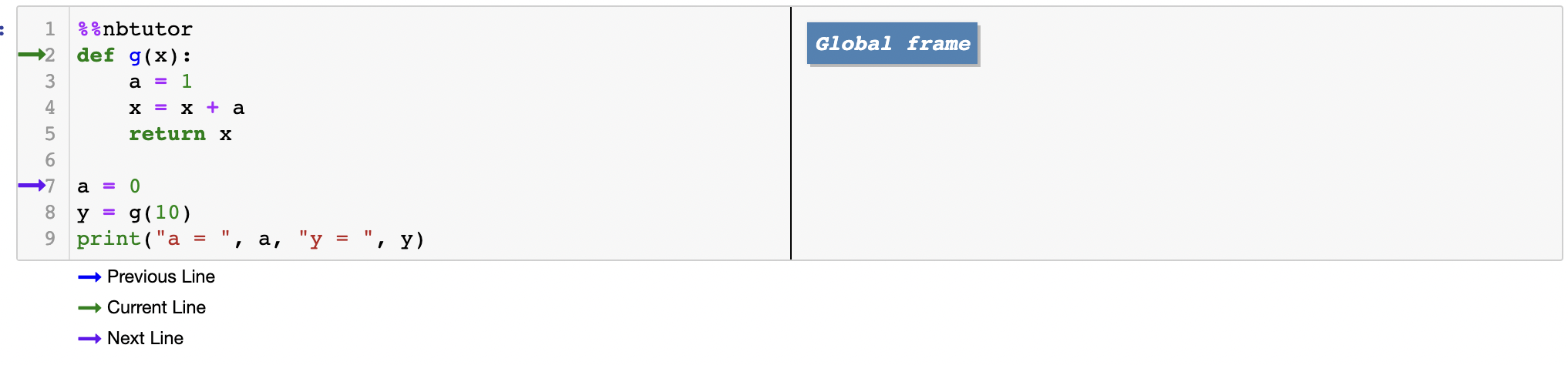
函数对象被创建,
g在全局命名空间中绑定到它。名称
a被绑定到0,同样在全局命名空间中。
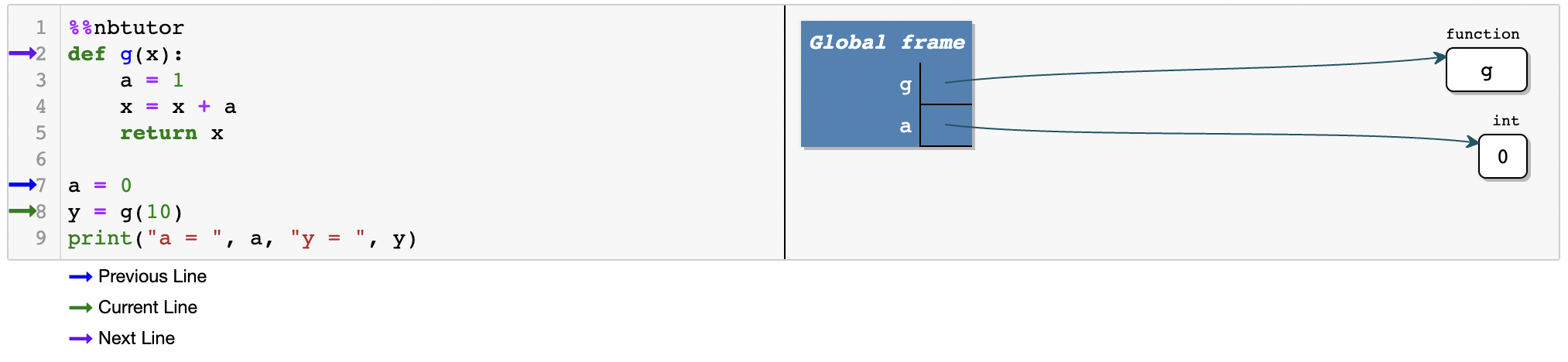
接下来通过 y = g(10) 调用 g,导致以下一系列操作:
为函数创建局部命名空间。
局部名称
x和a被绑定,使局部命名空间变为{'x': 10, 'a': 1}。
注意全局的 a 不受局部的 a 影响。
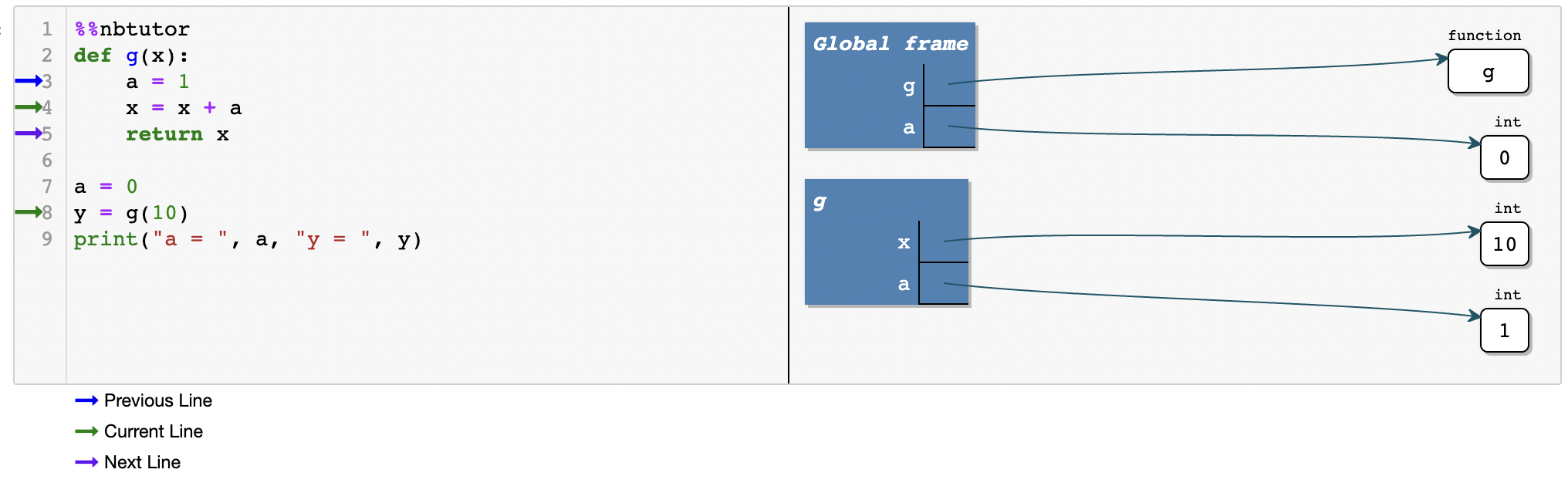
语句
x = x + a使用局部的a和局部的x计算x + a,并将局部名称x绑定到结果。该值被返回,
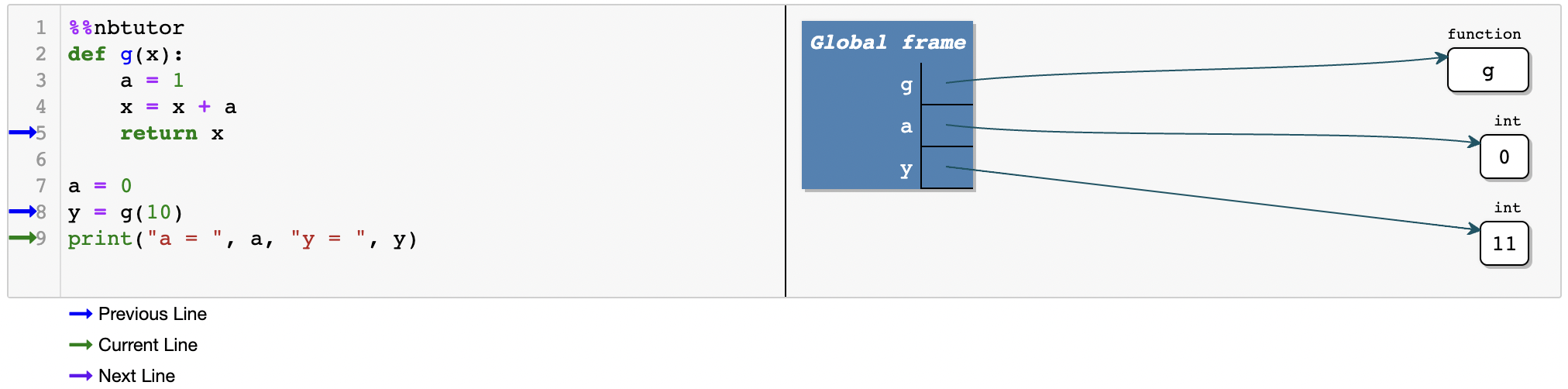
y在全局命名空间中绑定到它。局部的
x和a被丢弃(局部命名空间被释放)。
7.9.1. 可变 与 不可变 参数#
现在是进一步讨论可变对象与不可变对象的好时机。
考虑以下代码段:
def f(x):
    x = x + 1
    return x

x = 1
print(f(x), x)
2 1
我们现在理解这里会发生什么:代码打印 2 作为 f(x) 的值,打印 1 作为 x 的值。
首先,f 和 x 在全局命名空间中注册。
调用 f(x) 创建一个局部命名空间,并将 x 添加到其中,绑定到 1。
接下来,这个局部的 x 被重新绑定到新的整数对象 2,并返回该值。
这一切都不影响全局的 x。
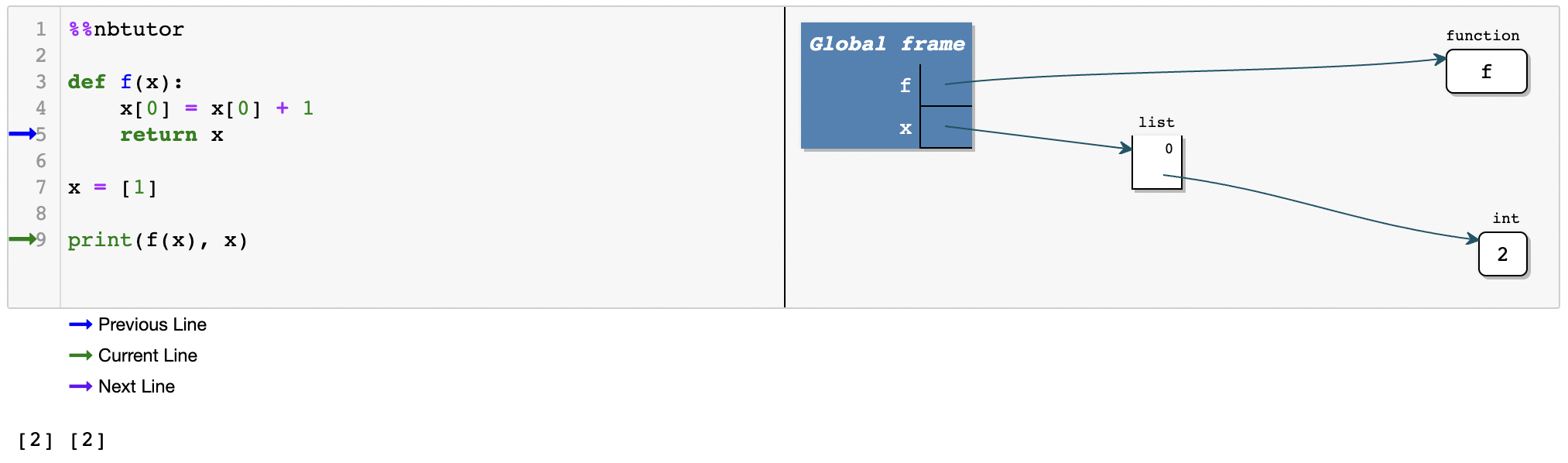
然而,当我们使用可变数据类型(例如列表)时,情况就不同了:
def f(x):
    x[0] = x[0] + 1
    return x

x = [1]
print(f(x), x)
[2] [2]
这会打印 [2] 作为 f(x) 的值,x 的值相同。
以下是发生的情况:
f在全局命名空间中注册为一个函数
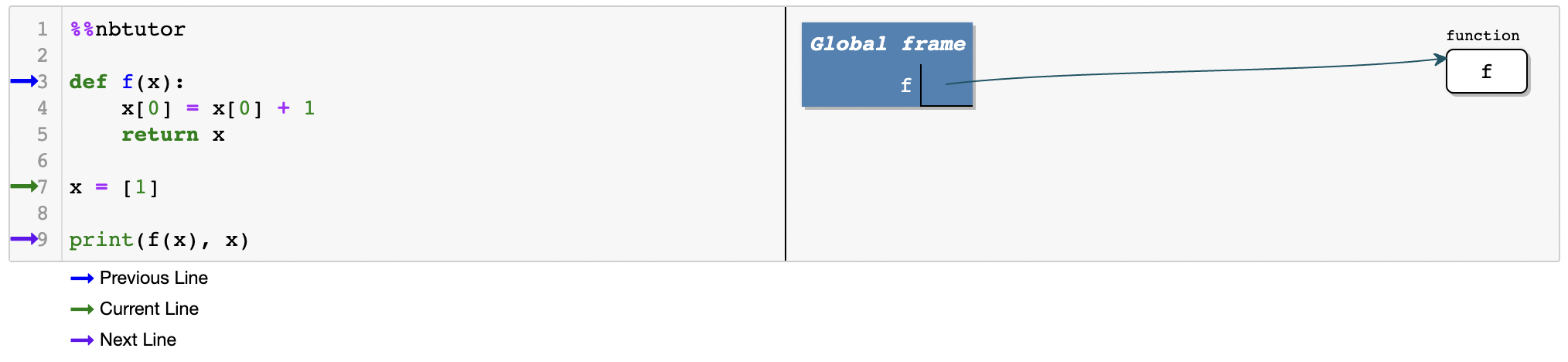
x在全局命名空间中绑定到[1]
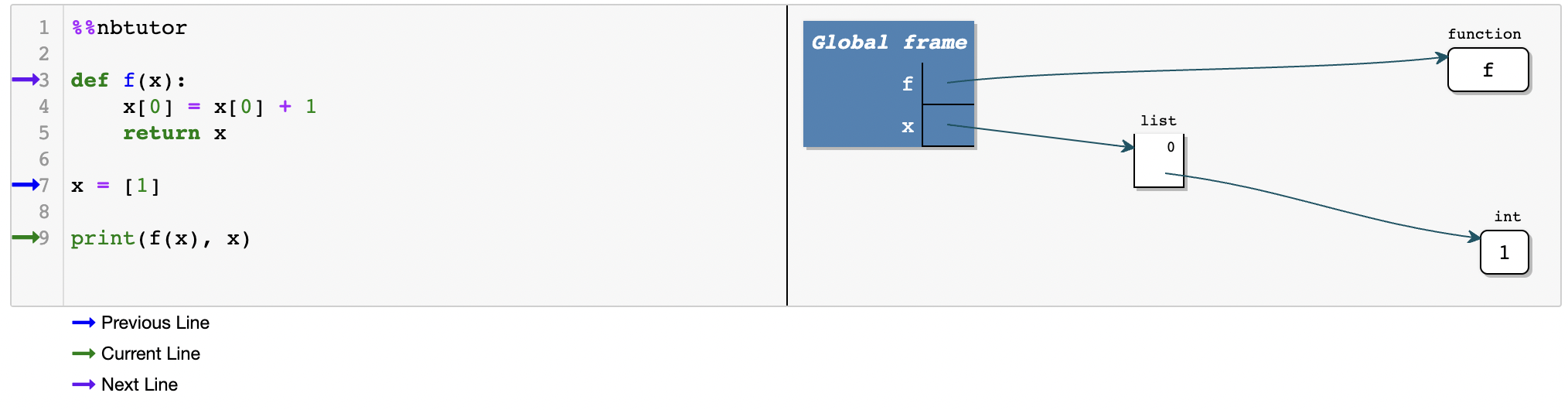
调用
f(x)创建一个局部命名空间
将
x添加到局部命名空间,绑定到[1]
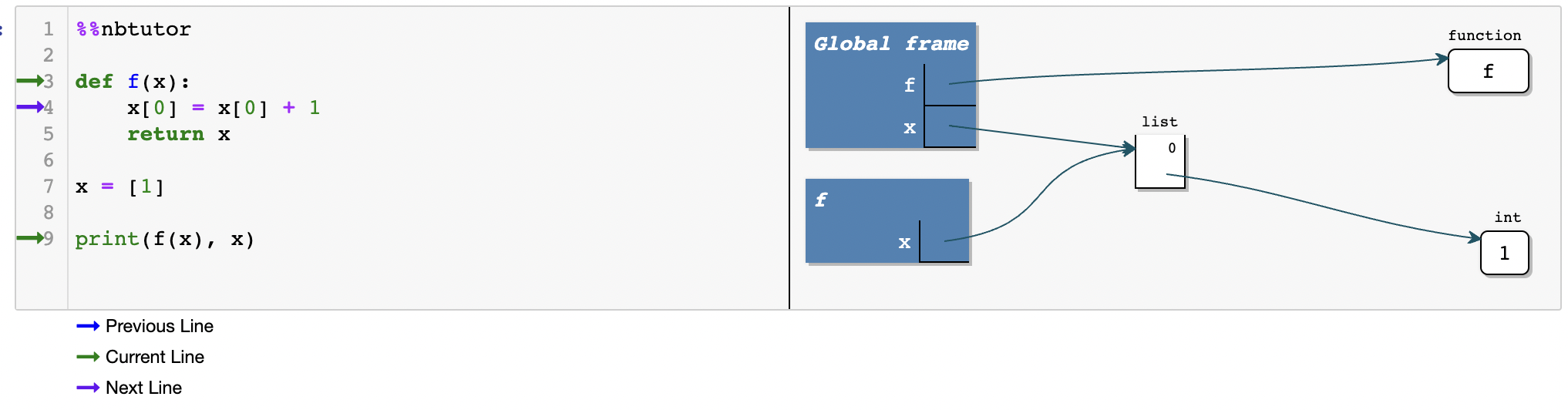
Note
全局的 x 和局部的 x 指向同一个 [1]
我们可以看到局部 x 的标识符和全局 x 的标识符是相同的:
def f(x):
    x[0] = x[0] + 1
    print(f'the identity of local x is {id(x)}')
    return x

x = [1]
print(f'the identity of global x is {id(x)}')
print(f(x), x)
the identity of global x is 139813607405248
the identity of local x is 139813607405248
[2] [2]
在
f(x)内部列表
[1]被修改为[2]返回列表
[2]
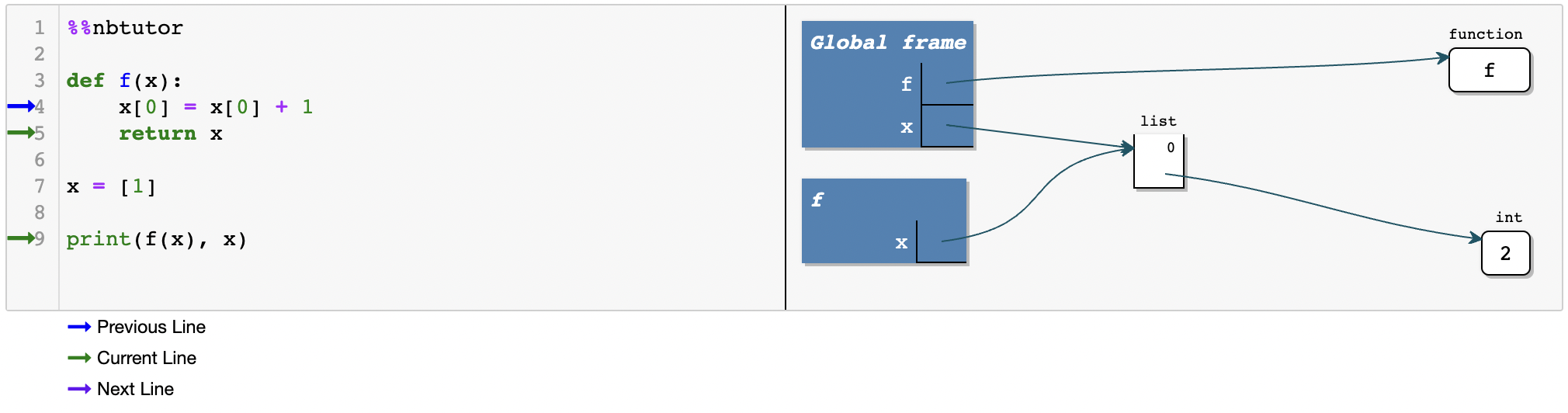
局部命名空间被释放,局部的
x消失
如果你想分别修改局部的 x 和全局的 x,可以创建列表的副本,并将副本赋值给局部的 x。
我们将留给你自行探索。